> ## Documentation Index
> Fetch the complete documentation index at: https://docs.jsonsilo.com/llms.txt
> Use this file to discover all available pages before exploring further.
# Regions
> Guide on how to manage a silo region.
## Introduction
In this guide, we explain the concept of silo regions and region codes.
## Regions
JSONsilo is committed to delivering global availability, powering millions of requests daily to services and devices worldwide.
### Asia
| Region | Code | Status |
| --------- | ----------- | ----------- |
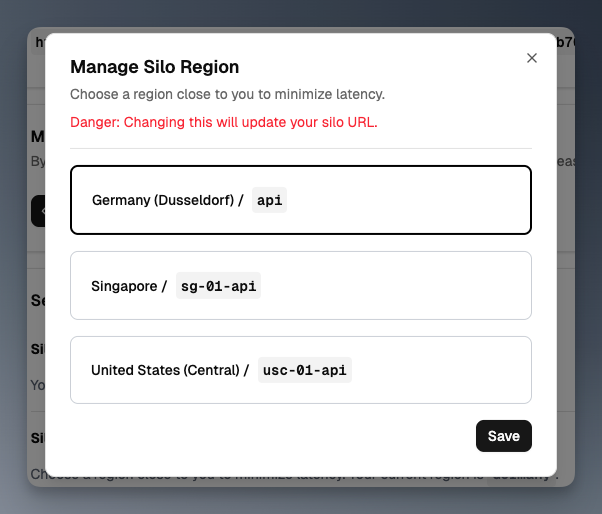
| Singapore | `sg-01-api` | Available |
| Japan | N/A | Coming Soon |
| India | N/A | Coming Soon |
| Malaysia | N/A | Coming Soon |
### Europe
| Region | Code | Status |
| ------------------- | ----- | --------- |
| Germany: Düsseldorf | `api` | Available |
### North America
| Region | Code | Status |
| ---------------------- | ------------ | ----------- |
| United States: Central | `usc-01-api` | Available |
| United States: West | N/A | Coming Soon |
## How to Change Silo Region
To change the region of your silo, follow these steps:
Ensure there are no active requests when changing the region. Otherwise, you may receive a `404` error.
After updating the region, use the correct base URL for the selected region.
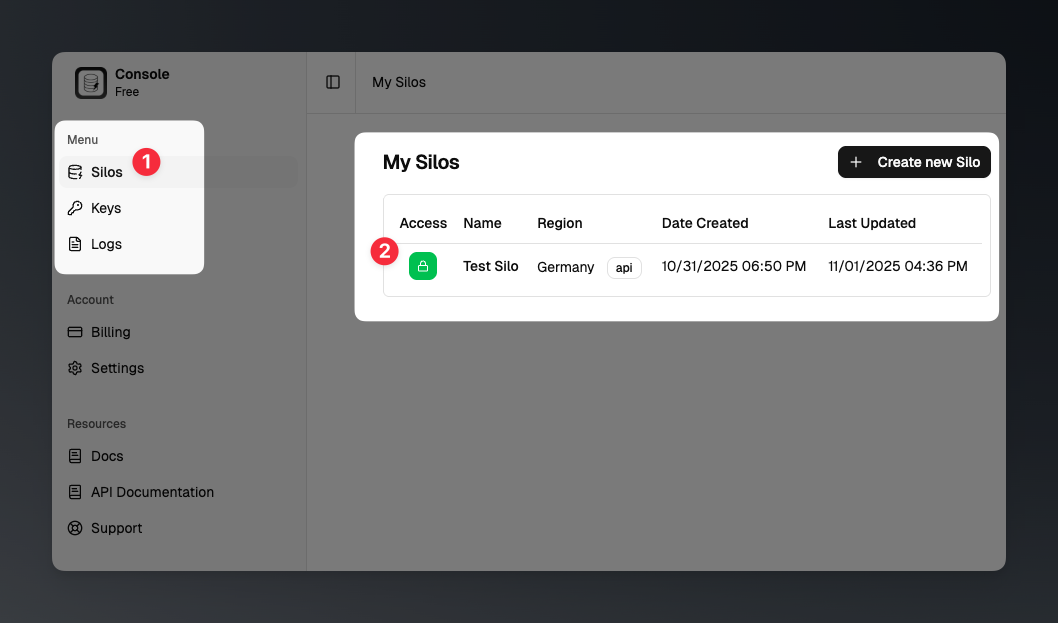
Click the "Silos" menu in the sidebar to view your list of silos. Select the silo you want to update by clicking its name.
 Scroll to the bottom of the silo details page, and in the *Settings* section, click the `Manage` button to update your silo region.
 In the dialog, select the desired region from the list and click the `Save` button to save your changes.
Changing this will update your silo URL.
In the dialog, select the desired region from the list and click the `Save` button to save your changes.
Changing this will update your silo URL.